
Guide
Let an AI agent build and simulate circuits (MCP server and CLI)
BetterSPICE has an MCP server, bspice mcp, that lets an AI agent such as Claude Code build, simulate and measure circuits. The agent edits the circuit you have open, you see each edit as it happens, and you can undo it or take over with Esc. Without the app, the same tools work on circuit files, and bspice runs analyses from a shell.
Checked on 20 November 2026. BetterSPICE beta 0.9.0. Everything about BetterSPICE here comes from its manual (chapters 70 and 71) and its agent API reference.
What an agent can do
The MCP server is bspice mcp. It speaks MCP over standard input and output, so Claude Code or any other MCP client can use it. When the BetterSPICE window is open, the agent edits the circuit you have open, with the same operations as your own clicks. When it is not, the same tools edit circuit files on disk.
- Build. Open a circuit or an example, add parts with a type, id and position, draw wires, set a parameter, move, delete and undo. A list of edits sent together is one undo step, and if one edit fails none is applied.
- Simulate. Run an operating point, transient, AC, DC sweep, noise, pole-zero or loop-gain analysis, with ngspice or PSpice for vendor models, and get the signals and measurements back. Numbers can be written the way an engineer writes them, such as
10m. - Read. Live probe values, the minimum, maximum, mean, RMS, peak to peak and final value of the last run, a signal’s data thinned to a number of points, the diagnostics, a screenshot of the canvas or a render when there is no window, and the HTML report.
- Check.
verify_circuitcompares the engine with ngspice on the circuit the agent just built.
Every tool is listed in manual chapter 70.3; the command line is in chapter 71.
A short example
Set it up once, from a terminal:
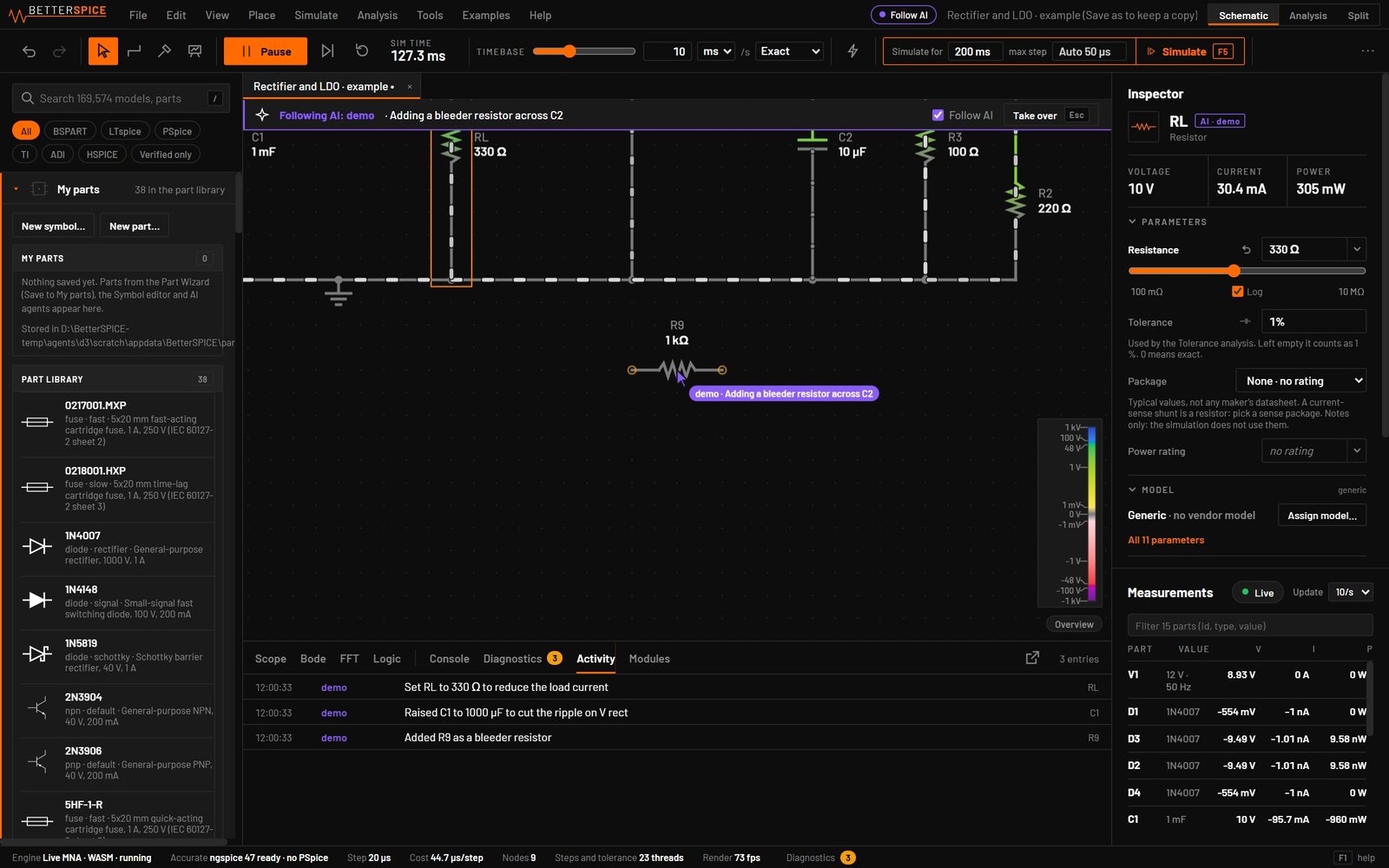
$ claude mcp add bspice -- bspice mcpThen open BetterSPICE and ask, in the words of the manual’s own exercise: “Build a 1 kHz second-order Sallen-Key low-pass with a TL072 and show me its Bode plot.” What you should see, according to the manual: the bar at the top of the canvas shows each step as the agent places the parts, wires them, probes the output and runs the AC sweep in the Analysis view in front of you. Its cursor marks the part it is touching, and the Activity tab logs each edit with the agent’s name.
The same steps are available from the shell, one command for each tool, with JSON out:
$ bspice app add-part res --at 10,0
$ bspice app simulate tran --stop 10m
$ bspice app screenshot -o shot.png
$ bspice app help
And with no window at all, on a file:
$ bspice validate f.bsc
$ bspice tran f.bsc --stop 10m --max-step 1u --out waves.csv
$ bspice render f.bsc --png out.png
| Needs the window open | What it works on | Use it for | |
|---|---|---|---|
| MCP, window open | Yes | The circuit you have open; you watch each edit | Building a circuit together; Esc takes over |
| MCP, headless | No | Circuit files on disk | Batch work on files; the result says it ran headless |
bspice app | Yes | The open circuit, one command per tool | Shell scripts that need the window’s view and scope |
bspice op, tran, ac, dc | No | A file, never written over | Simulating in a script or CI |
| WebSocket control API | Window or bspice serve | The same methods as the tools, plus events | Your own agent or program |
Safety
- Local only. The app listens on 127.0.0.1, port 47800, and no other address. The agent needs a key that the app creates on your computer, and the MCP server reads it by itself. Treat it as a secret.
- You stay in control. Edits are normal undo steps, Ctrl Z takes them back, and Esc (Take over) refuses the agent’s edits for 10 seconds. Follow AI can be turned off to keep your view where it is.
- Headless runs say so. If the app is not running, or the connection fails, the result says that it ran on files and not in the window.
BSPICE_PORTchanges the port for the app and the agent together, so a script that must never touch your open window can use a port the app is not on. - Files are protected. No command writes over the circuit it reads, and edits to a file are locked one at a time so parallel runs keep every edit.
- Drawings follow the rules an engineer would. An agent’s edit is refused, with the fix, if it uses a made-up symbol, ties two close labels instead of drawing the wire, shorts a net or leaves a wire through a part.
- Runs are bounded. A transient that would not fit in memory is refused at once with
E_MEMORYand the ways out, and--timeoutstops a run in time.
How this differs from wrappers around other simulators
Community MCP servers exist that wrap LTspice or ngspice, for example ltspice-mcp on PyPI (listed 19 November 2026). They take a netlist or file and return results. In BetterSPICE the agent and you share one schematic that is already running, so you can watch and stop it. We have not compared it with those servers feature by feature, and other simulators may add their own agent support.
Sources
- BetterSPICE manual: chapter 70, Working with an AI agent (setup, what you see, every tool, errors) and chapter 71, The command line.
- BetterSPICE, the agent API reference (
docs/AGENT_API.mdin the repository, which opens soon): ports, authentication, headless behaviour, drawing rules. - ltspice-mcp on PyPI, listed 19 November 2026.
Watch an agent work
Join the beta to get the desktop app, where the agent tools run. You can try the app itself in your browser at app.bspicesim.com first; the agent tools need the desktop app.
Questions people ask
What is the BetterSPICE MCP server?
It is bspice mcp, a Model Context Protocol server that lets an AI agent such as Claude Code open, build, simulate and measure circuits. With the BetterSPICE window open it edits the circuit you have open. Without the window it edits circuit files on disk.
How do I connect Claude Code?
Run claude mcp add bspice -- bspice mcp, or put the command bspice with the argument mcp into an MCP configuration file. The agent name shown in the app comes from BSPICE_AGENT_NAME or from the name the client reports.
Can I watch and stop the agent?
Yes. The top bar of the canvas names the agent and its action, its cursor marks the part, and Activity logs every edit. Ctrl+Z undoes its edits, and Esc takes over: the agent’s edits are refused for 10 seconds.
Is it safe to let an agent edit my circuits?
The server answers only on 127.0.0.1 and needs a key from your computer. Edits are undo steps, a failed batch applies nothing, no command writes over the circuit it reads, and drawings that break the rules, such as shorts, are refused with the fix. It is still a beta, so keep your own copies of work that matters.
Does it work without the app open?
Yes. The same tools edit .bsc files headless, and plain commands such as bspice tran run an analysis from a script. Each headless result says it ran on files and not in the window.
Which analyses can the agent run?
Operating point, transient, AC, DC sweep, noise, pole-zero and loop gain through the simulate tool, with ngspice or PSpice for vendor models.