
Guide
A free Multisim Live alternative for students and teachers
Multisim Live reached end of life on 15 September 2026. BetterSPICE is a free circuit simulator for Windows, macOS and Linux that runs the circuit while you draw, and the full app also runs in your browser at app.bspicesim.com, with nothing to install. It opens Multisim .ms11 to .ms14 designs, including Multisim Live exports, as drawn schematics with an Import report, so your lab circuits come with you.
Checked on 20 November 2026. BetterSPICE beta 0.9.0. Facts about other tools come from the sources listed at the bottom, each with the date it was read.
What changed on 15 September 2026
Digilent, an NI company, announced that the browser version would reach end of life on 15 September 2026 and that NI is putting its investment into the NI Circuit Design Suite (Multisim Desktop) for Windows. Digilent also says it does not guarantee continued access to Multisim Live data, saved designs included. It says designs can be downloaded and imported into Multisim Desktop, and that some metadata, such as comments, may not transfer [1].
What BetterSPICE offers instead
- Free, also at work. Use it for any purpose. Selling BetterSPICE itself is not allowed (license).
- A desktop app for Windows, macOS and Linux. It runs the circuit while you draw: wire colours follow the voltage, dots show the current, and you can change a value while it runs. F5 runs the full analysis on the same schematic: transient, AC, DC sweep, operating point, parameter step, FFT, noise, pole-zero, loop gain, Monte Carlo and worst case.
- The full app in a browser. app.bspicesim.com runs the same program with nothing to install, which suits a lab or a classroom: draw a circuit from scratch, simulate it, open the examples. It has about 2,000 open-licensed models; the full vendor library needs the desktop app.
- 1,000 example circuits in the app (press E), and 17 design calculators that place the circuit they designed.
- Numbers that are checked. Each release is compared with ngspice: 438 of 438 test circuits and 3,797 of 3,797 signals agree, and another 1,095 signals are checked against a closed form or a datasheet window. See manual chapter 76.
What it does not do
- It opens Multisim files. File > Import (or drag and drop) takes Multisim designs from .ms11 to .ms14, including Multisim Live exports (Export > NI Multisim 14 gives a .ms14). Each comes in as a drawn schematic with wires and an Import report that lists every part as matched, approximated or not imported. Tested on 237 real Multisim files: 95.9 % of the parts matched. Files from .ms10 and older do not open.
- The browser demo cannot place new parts. It plays and lightly edits existing circuits. Building a new circuit needs the desktop app.
- The downloads are not open yet. The site lists installers for every system as coming soon, together with the GitHub repository. Join the beta to get them now.
- It is a beta. Known gaps are listed under Download. The microcontroller part runs its own Arduino-style code, not compiled firmware.
Or rebuild a lab circuit: an RC low-pass filter
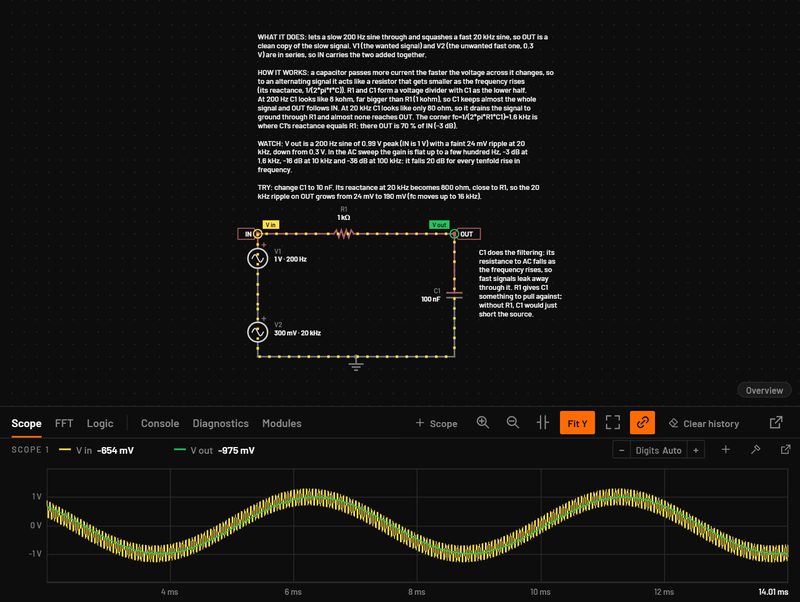
This is the first tutorial in the manual, shortened (chapter 2 has every step with pictures). A 1 V, 1 kHz sine goes into a 1 kΩ resistor and a 100 nF capacitor. The corner frequency is 1 / (2π × 1 kΩ × 100 nF) = 1.59 kHz.
- Press Ctrl N for a new circuit. The live simulation is on but has nothing in it yet.
- Press A and click to place the AC source, R for the resistor, C twice for an upright capacitor and G for two grounds. Esc leaves the placing tool.
- Drag from pin to pin to draw the wires. When the loop closes, the wires take colour and dots start to move.
- Press N, click a wire and type
IN; do the same forOUTbetween R and C. - Click C1 and type
100nin Capacitance; click V1 and set Amplitude1and Frequency1k. Typing100nmeans 100 nanofarads. - Press P and click the IN and OUT wires to put both traces on the scope. Set the timebase to see one period.
- Press F5 and choose an AC sweep to read the corner at 1.59 kHz, and compare it with your hand calculation or the filter calculator.
To see it first, open the RC low-pass in the demo.
Free options compared, 19 November 2026
A short list of tools a student or teacher can start with.
| Runs on | Schematic editor | Cost, as the maker states it | Notes | |
|---|---|---|---|---|
| BetterSPICE | Windows, macOS and Linux app, and the full app in a browser | Yes | Free; AGPL v3.0 with the Commons Clause; beta 0.9.0 | Runs while you draw. Opens Multisim .ms11 to .ms14 files. Downloads open soon. |
| LTspice | Windows 10/11 x64, Windows 11 ARM64 and macOS | Yes | Free, from Analog Devices [2] | Mature and widely taught. The macOS build of version 26 is reported to be Intel-only (see the Mac page). |
| KiCad | Desktop | Yes, with ngspice built in | Open source [3] | A PCB suite first. BetterSPICE opens its files. |
| Qucs-S | Linux, Windows, FreeBSD; Homebrew for macOS | Yes | GPL-2.0 [4] | A schematic front end for ngspice and other simulation kernels. |
| TINACloud | Browser | Yes | See tina.com for current plans | Its blog describes converting Multisim Live .msjs files [5]. |
| Tinkercad Circuits | Browser | Yes | See tinkercad.com for current terms | Autodesk’s browser tool for beginner circuits and Arduino projects. |
| NI Circuit Design Suite (Multisim Desktop) | Windows | Yes | Sold by Digilent and NI as Education and Industry editions [1] | The product NI says it is focusing on after Multisim Live. |
Sources
- Digilent, Multisim Live EOL Letter, as quoted in search results on 19 November 2026 (the page itself sat behind a bot check).
- Analog Devices, LTspice, as archived on 17 September 2026. See BetterSPICE vs LTspice.
- KiCad, kicad.org/discover/spice, read through search on 19 November 2026: ngspice integrated in the Schematic Editor.
- Qucs-S, GitHub repository (GPL-2.0), read on 18 November 2026.
- TINA, Converting and running Analog Multisim Live circuits in TINACloud, read through search on 19 November 2026.
- BetterSPICE: the user manual and license.
Multisim is a trademark of National Instruments. LTspice is a registered trademark of Analog Devices, Inc. BetterSPICE is not affiliated with either.
Try the live view first
Open the app in your browser at app.bspicesim.com and build your first lab circuit, or join the beta for the desktop app.
Questions people ask
Can BetterSPICE open my Multisim Live or Multisim files?
Yes, from version 0.9.0: Multisim designs from .ms11 to .ms14, including Multisim Live exports (Export > NI Multisim 14). Each opens as a drawn schematic with an Import report listing every part as matched, approximated or not imported. Files from .ms10 and older do not open.
Is BetterSPICE free for a class?
Yes. BetterSPICE is free to use for any purpose, also at work. Selling BetterSPICE itself is not allowed. It is a beta, version 0.9.0.
Can students use it without installing anything?
Yes. The full app runs in a browser at app.bspicesim.com with nothing to install: build circuits from scratch, simulate them and use the examples and calculators. It has about 2,000 open-licensed models; the full vendor library needs the desktop app.
Is there a download yet?
The site lists the Windows, macOS and Linux installers as coming soon, together with the GitHub repository. Joining the beta gives access to the installers now.
Does it run on Mac and Linux as well as Windows?
Yes. The app runs on Windows 10 and 11 (x64), on macOS 11 or later on Apple Silicon, and on Linux with packages for Ubuntu and Debian, Arch, NixOS and an AppImage.
How does it compare with Multisim for accuracy?
We have not compared it with Multisim. BetterSPICE is checked against ngspice: 438 of 438 test circuits and 3,797 of 3,797 signals agree, and 1,095 more against a closed form or datasheet window.